
Loading page
nova 판매
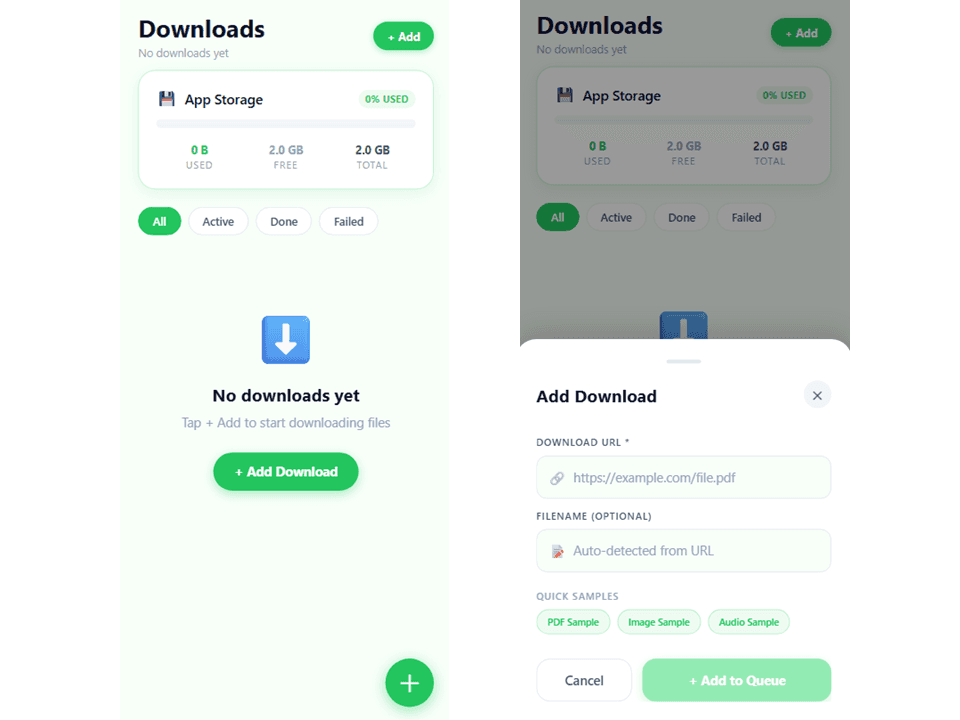
A React Native file manager screen built with Expo Router and TypeScript, featuring search, multi-type filtering (PDF, images, video, audio, docs, archives, code), and dynamic sorting by name, size, or date. Includes storage usage tracking, file item actions (open, share, delete), and responsive styling with platform-specific handling for web and mobile. Perfect for download management or document browsing features in mobile apps.
Mobile UHI0 is a React Native file management screen built with Expo Router and TypeScript. It provides a complete files interface for viewing, searching, filtering, and managing downloaded files with a modern, responsive design.
You will still need backend integration for storing the file and download streaming!
react-native-safe-area-contextnpm install react-native react-native-safe-area-context expo-router expo-status-bar
The component requires:
downloads, totalStorageUsed, and removeDownloadgetFileTypeIcon, getFileTypeLabel, and type definitions// Root layout wraps app with SafeAreaProvider
<RootLayout>
<FilesScreen />
</RootLayout>
FilesScreen manages:
search - Current search querytypeFilter - Active file type filter ("all" or specific FileType)sort - Current sort key ("name", "size", or "date")searchFocused - Search input focus stateAvailable filters: All, PDF, Images, Video, Audio, Docs, Archives, Code
Each filter displays a badge with the count of matching files.
Uses a centralized theme system with:
All styles are defined in StyleSheet.create() for optimal performance.
격리된 샌드박스를 띄워 서버에서 바로 실행하세요 — 로컬 설정 불필요.
샌드박스 검증이 완료되었으며 감지된 실행 경로가 통과했습니다.
This React, React Native mobile app completed archive review. Structure, dependency manifests, documentation, functional source, and common risk patterns were checked by the Tetrees verification pipeline; runtime phases are stated separately.
Deterministic AVCP artifact review
파이프라인 avcp-2026-08-04.1 · SHA-256 df1c39ec99225c23…
This version-scoped review deterministically inspects the submitted archive for structure, dependencies, documentation, functional source, and common malicious or high-risk signals. Build and test phases are reported as passed only after an isolated sandbox audition. It is not a guarantee of perfect security.
검토일 2026년 8월 4일
전체 설치 가이드와 연동 프롬프트는 구매 후 열람할 수 있습니다.
이 제품을 AI IDE, 웹 빌더 또는 클라우드 IDE로 바로 가져오세요.
Download your licensed source snapshot from the library, then follow the setup guide in your workspace.
리뷰 19개
Rock solid so far. Used this mobile template to build my app and it cut days off the build.
Genuinely impressed. Dropped "Mobile Downloader Starter Template" straight into the app; the README covered every config I needed. Minor tweaks needed for my use case but nothing broke.
Genuinely impressed. As someone who builds these all day, the abstractions are sensible and easy to swap out. Support answered my question fast.
Dropped it into my stack and it just worked. Picked up "Mobile Downloader Starter Template" for a client app — The abstractions are sensible and easy to swap out. Exactly as described.
Great starting point. Zero mystery dependencies, everything is documented, and even the tricky env setup was explained well. Highly recommend.
Great starting point. Dropped "Mobile Downloader Starter Template" straight into the app; even the tricky env setup was explained well. Minor tweaks needed for my use case but nothing broke.
Exactly what I needed. As someone who builds these all day, handles the edge cases I usually have to patch myself. Exactly as described.
Saved me a ton of time. Used this mobile template to build my app and it cut days off the build.
Rock solid so far. TypeScript types are actually accurate, no fighting the compiler, and docs were clear enough that I never had to open an issue. Exactly as described.
Worth every point. As someone who builds these all day, no spaghetti — the folder layout is sane. Will definitely check their other products.
토론을 불러오는 중…