
Loading page
devbyibrahim 판매
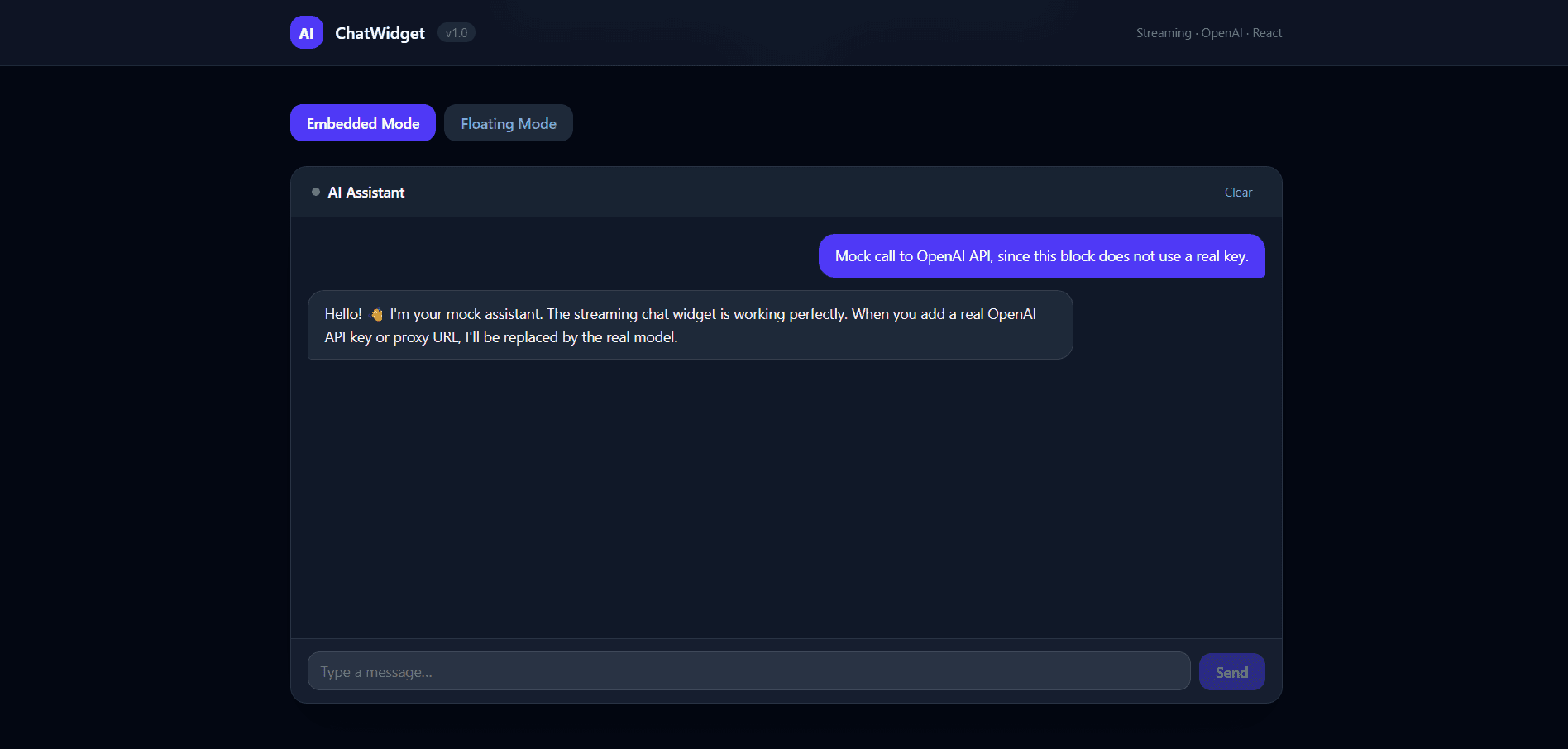
A floating or embedded chat box you drop into any website. User types a message, it sends to OpenAI, streams the reply back in real time. Buyers use it to add a chatbot to their product without building one from scratch.et
A plug-and-play React streaming chat widget powered by OpenAI. Drop it into any React app as a floating FAB or an embedded panel — no backend required for prototyping, proxy-ready for production.
Renders a fully-featured chat UI that streams responses token-by-token from OpenAI's Chat Completions API. Supports both a floating button + popover pattern and a full embedded panel pattern.
floating (FAB + popover) or embedded (inline panel)proxyUrl to keep your API key server-sideThis block is self-contained inside src/feature/. Copy the feature/ directory into your project and import from src/index.ts.
# Peer dependencies (if not already installed)
npm install react react-dom openai
Keep your API key server-side by pointing proxyUrl at your own backend endpoint that forwards requests to OpenAI.
import { ChatWidget } from './src/index'

export default function App() {
  return (
    <ChatWidget
      proxyUrl="https://your-backend.com/api/chat"
      mode="floating"
      title="AI Assistant"
      systemPrompt="You are a helpful assistant."
    />
  )
}
⚠️ The key is visible in DevTools. Never ship this pattern to production.
import { ChatWidget } from './src/index'

export default function App() {
  return (
    <ChatWidget
      apiKey={import.meta.env.VITE_OPENAI_API_KEY}
      mode="embedded"
      title="Support"
      model="gpt-4o-mini"
    />
  )
}
격리된 샌드박스를 띄워 서버에서 바로 실행하세요 — 로컬 설정 불필요.
이 제품을 AI IDE, 웹 빌더 또는 클라우드 IDE로 바로 가져오세요.
Download your licensed source snapshot from the library, then follow the setup guide in your workspace.
아직 리뷰가 없습니다.
토론을 불러오는 중…
useChatimport { useChat } from './src/index'
function MyCustomUI() {
const { messages, isLoading, error, sendMessage, clearMessages } = useChat({
proxyUrl: 'https://your-backend.com/api/chat',
systemPrompt: 'You are a concise assistant.',
})
return (
<div>
{messages.map((m) => (
<p key={m.id}><strong>{m.role}:</strong> {m.content}</p>
))}
<button onClick={() => sendMessage('Hello!')}>Send</button>
</div>
)
}
| Variable | Required | Description |
|---|---|---|
VITE_OPENAI_API_KEY | No | Direct OpenAI key. Dev/demo only — visible in the browser. |
VITE_PROXY_URL | No | Backend proxy URL. Recommended for production. |
VITE_MOCK_OPENAI | No | Set to true to enable mock streaming mode (no real API calls). |
Create a .env file in the project root:
# Option A — direct key (dev only)
VITE_OPENAI_API_KEY=sk-your-key-here

# Option B — proxy (production)
VITE_PROXY_URL=https://your-backend.com/api/chat

# Option C — mock mode (no key needed)
VITE_MOCK_OPENAI=true
When VITE_MOCK_OPENAI=true (or when VITE_OPENAI_API_KEY is the placeholder sk-your-key-here), the widget streams a canned response locally — no network request is made. This is ideal for:
<ChatWidget />| Prop | Type | Default | Description |
|---|---|---|---|
proxyUrl | string | — | Backend proxy URL (recommended for production) |
apiKey | string | — | Direct OpenAI key (dev/demo only) |
model | string | "gpt-4o-mini" | OpenAI model identifier |
systemPrompt | string | "You are a helpful assistant." | System message prepended to every request |
mode | "floating" | "embedded" | "floating" | Display mode |
title | string | "AI Assistant" | Header title text |
useChat(config)const { messages, isLoading, error, sendMessage, clearMessages } = useChat({
proxyUrl?: string
apiKey?: string
model?: string
systemPrompt?: string
})
Returns the full chat state and action dispatchers. Use this hook to build a fully custom UI while keeping the streaming logic.
streamChat(options)Low-level streaming function. Calls OpenAI (or your proxy) and yields StreamChunk objects via an async generator.
import { streamChat } from './src/feature/api/openai'

for await (const chunk of streamChat({ messages, apiKey, model })) {
  if (!chunk.done) process.stdout.write(chunk.delta)
}
withRetry(fn, options?)Wraps any async function with exponential back-off retry logic.
import { withRetry } from './src/index'

const result = await withRetry(() => fetch('/api/chat'), { retries: 3, delay: 500 })
ChatErrorCustom error class thrown by streamChat. Carries a status code for programmatic handling.
import { ChatError, isRateLimitError, isAuthError } from './src/index'

try {
  // ...
} catch (err) {
  if (isRateLimitError(err)) console.warn('Rate limited — slow down')
  if (isAuthError(err)) console.error('Invalid API key')
}
src/
├── index.ts                  # Public API entry point
├── App.tsx                   # Demo application
└── feature/
    ├── index.ts              # Feature-level re-exports
    ├── api/
    │   ├── openai.ts         # streamChat — real OpenAI SSE streaming
    │   ├── openai.mock.ts    # Mock streaming for dev/demo
    │   └── stream-parser.ts  # SSE response parser
    ├── components/
    │   ├── ChatWidget.tsx    # Main widget component
    │   ├── MessageList.tsx   # Scrollable message history
    │   ├── MessageBubble.tsx # Individual message bubble
    │   └── InputBar.tsx      # Text input + send button
    ├── hooks/
    │   ├── useChat.ts        # Primary chat state hook
    │   └── useStreamingReply.ts # Streaming token accumulator
    ├── types/
    │   └── index.ts          # Shared TypeScript types
    └── utils/
        ├── errors.ts         # ChatError + type guards
        ├── retry.ts          # withRetry utility
        └── sanitize.ts       # Content sanitization
# Start dev server with mock mode (no API key needed)
VITE_MOCK_OPENAI=true npm run dev

# Build for production
npm run build

# Type-check
npm run typecheck
샌드박스 검증이 완료되었으며 감지된 실행 경로가 통과했습니다.
This React web app completed archive review with strong static results. Structure, dependency manifests, documentation, functional source, and common risk patterns were checked by the Tetrees verification pipeline; runtime phases are stated separately. Final verified scores after isolated runtime evidence: overall 8.8 and security 9.
Deterministic AVCP artifact review
파이프라인 avcp-2026-08-04.1 · SHA-256 b10b4924aa04da45…
This version-scoped review deterministically inspects the submitted archive for structure, dependencies, documentation, functional source, and common malicious or high-risk signals. Build and test phases are reported as passed only after an isolated sandbox audition. It is not a guarantee of perfect security.
검토일 2026년 8월 7일
전체 설치 가이드와 연동 프롬프트는 구매 후 열람할 수 있습니다.
SaaS, AI & Subscription Products
US$17.53

