
Loading page
由 Pavel 出售
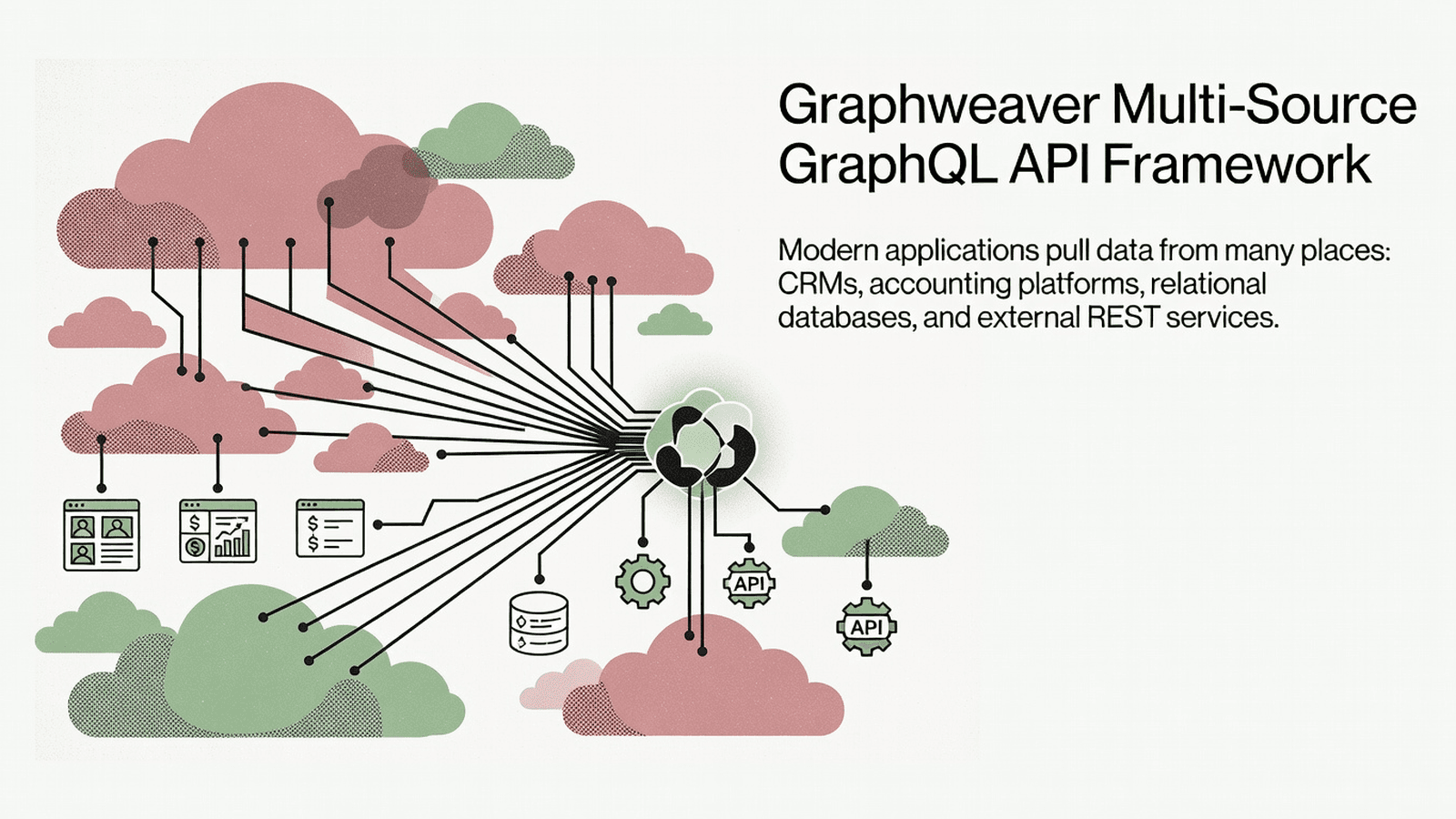
Graphweaver is a code-first, self-hostable GraphQL framework that unifies multiple data sources—databases, REST APIs, and SaaS platforms—into a single instant CRUD API with a built-in Admin UI and granular security controls.
This block provides the built-in page components for the Graphweaver Admin UI: analytics, entity list, GraphQL playground, and the root layout. It targets backend/fullstack teams embedding the Graphweaver admin interface into a Node.js + TypeScript project that serves a GraphQL API.
admin-ui/ - The deployable Admin UI application (React SPA with routing, pages, and entry point)admin-ui-components/ - Reusable React component library (badges, alerts, assets, custom fields, Storybook setup)apollo-client/ - Apollo Client configuration for communicating with the Graphweaver GraphQL APIauth/ - Server-side authentication logic and middlewareauth-ui-components/ - Auth-specific UI components (login forms, session handling)aws-cognito/ - AWS Cognito authentication adapterbuilder/ - Schema and resolver builder utilitiescdk/ - AWS CDK deployment constructs for Graphweavercli/ - Command-line interface for scaffolding and managing Graphweaver projectsconfig/ - Shared configuration helpers and defaultscore/ - Core GraphQL resolver engine and entity primitivesend-to-end/ - End-to-end test harnessload-testing/ - Load testing scripts and configurationlogger/ - Structured logging utilitiesmikro-orm-sqlite-wasm/ - SQLite WASM adapter for Mikro-ORMmikroorm/ - Mikro-ORM data source adapterrest/ - REST data source adapterrest-legacy/ - Legacy REST adapter for backward compatibilityscalars/ - Custom GraphQL scalar definitionsserver/ - Express/Apollo Server bootstrap and middleware wiringstorage-provider/ - File and object storage provider abstractionvite-plugin-graphweaver/ - Vite plugin for building the Admin UIxero/ - Xero accounting platform data source adapternpm install react react-dom react-router-dom @apollo/client graphql
npm install --save-dev typescript vite @vitejs/plugin-react
启动隔离沙箱并在服务器端直接运行 — 无需本地配置。
此版本的 Tetrees AI Review
This React web app completed archive review with strong static results. Structure, dependency manifests, documentation, functional source, and common risk patterns were checked by the Tetrees verification pipeline; runtime phases are stated separately.
Deterministic AVCP artifact review
管道 avcp-2026-08-04.1 · SHA-256 423a144f23af84eb…
This version-scoped review deterministically inspects the submitted archive for structure, dependencies, documentation, functional source, and common malicious or high-risk signals. Build and test phases are reported as passed only after an isolated sandbox audition. It is not a guarantee of perfect security.
审查日期 2026年8月4日
将此产品直接导入你的 AI IDE、网页构建器或云端 IDE。
Download your licensed source snapshot from the library, then follow the setup guide in your workspace.
暂无评价。
Sign in to join the discussion
Loading discussion…
No native modules, pod installs, or Android linking steps are required. This is a pure TypeScript/React package.
Copy the source/ directory into your project root, for example at src/graphweaver/.
Add path aliases to tsconfig.json so TypeScript resolves internal cross-package imports:
{
  "compilerOptions": {
    "baseUrl": ".",
    "paths": {
      "@graphweaver/admin-ui/*": ["src/graphweaver/admin-ui/src/*"],
      "@graphweaver/admin-ui-components/*": ["src/graphweaver/admin-ui-components/src/*"]
    },
    "jsx": "react-jsx",
    "module": "ESNext",
    "moduleResolution": "bundler",
    "strict": true
  }
}
vite.config.ts:import { defineConfig } from 'vite';
import react from '@vitejs/plugin-react';
import { resolve } from 'path';
export default defineConfig({
plugins: [react()],
resolve: {
alias: {
'@graphweaver/admin-ui': resolve(__dirname, 'src/graphweaver/admin-ui/src'),
},
},
});
.env file at project root:VITE_API_URL=http://localhost:3000/graphql
src/graphweaver/admin-ui/src/main.tsx as the entry point for the Admin UI SPA, or import individual page components into an existing router.// exported from admin-ui/src/pages/analytics/component.tsx
// re-exported via admin-ui/src/pages/analytics/index.ts
// and admin-ui/src/pages/index.ts
export { AnalyticsPage } from './pages/analytics';
A React component that renders the analytics dashboard page. Use it when you want to mount the analytics view at a specific route in an existing React Router setup. It queries usage statistics from the Graphweaver GraphQL API through the Apollo Client context.
// exported from admin-ui/src/pages/list/component.tsx
// re-exported via admin-ui/src/pages/list/index.ts
// and admin-ui/src/pages/index.ts
export { ListPage } from './pages/list';
A React component that renders a paginated, filterable entity list for a given GraphQL type. Use it as the primary data browsing view for any registered Graphweaver entity. It reads the current entity from the router context and issues list queries automatically.
// exported from admin-ui/src/pages/playground/component.tsx
// re-exported via admin-ui/src/pages/playground/index.ts
// and admin-ui/src/pages/index.ts
export { PlaygroundPage } from './pages/playground';
A React component that embeds an interactive GraphQL Playground (or compatible IDE) pointed at the configured API endpoint. Use it to provide developers and admins with an in-browser query editor within the Admin UI.
// exported from admin-ui/src/pages/root/component.tsx
// re-exported via admin-ui/src/pages/root/index.ts
// and admin-ui/src/pages/index.ts
export { RootPage } from './pages/root';
The top-level layout component that wraps all other Admin UI pages. It provides the navigation shell, sidebar, and global context providers. Mount this as the layout route in React Router and nest all other pages inside it.
You have a React + React Router v6 app and want to embed the Graphweaver Admin UI pages alongside your own routes without running a separate SPA.
import { createBrowserRouter, RouterProvider, Outlet } from 'react-router-dom';
import { ApolloClient, InMemoryCache, ApolloProvider } from '@apollo/client';
import { RootPage } from './graphweaver/admin-ui/src/pages/root';
import { ListPage } from './graphweaver/admin-ui/src/pages/list';
import { AnalyticsPage } from './graphweaver/admin-ui/src/pages/analytics';
import { PlaygroundPage } from './graphweaver/admin-ui/src/pages/playground';

const client = new ApolloClient({
  uri: import.meta.env.VITE_API_URL,
  cache: new InMemoryCache(),
});

const router = createBrowserRouter([
  {
    path: '/admin',
    element: (
      <ApolloProvider client={client}>
        <RootPage />
      </ApolloProvider>
    ),
    children: [
      { path: ':entity', element: <ListPage /> },
      { path: 'analytics', element: <AnalyticsPage /> },
      { path: 'playground', element: <PlaygroundPage /> },
    ],
  },
]);

export default function App() {
  return <RouterProvider router={router} />;
}
You want only the analytics view embedded in an existing dashboard shell without the full Admin UI navigation.
import { ApolloClient, InMemoryCache, ApolloProvider } from '@apollo/client';
import { AnalyticsPage } from './graphweaver/admin-ui/src/pages/analytics';

const client = new ApolloClient({
  uri: 'https://api.example.com/graphql',
  cache: new InMemoryCache(),
});

export function DashboardShell() {
  return (
    <ApolloProvider client={client}>
      <div style={{ padding: '2rem' }}>
        <h1>Operations Overview</h1>
        <AnalyticsPage />
      </div>
    </ApolloProvider>
  );
}
You want to expose a /dev/playground route in development builds only.
import { PlaygroundPage } from './graphweaver/admin-ui/src/pages/playground';
import { ApolloClient, InMemoryCache, ApolloProvider } from '@apollo/client';

const client = new ApolloClient({
  uri: import.meta.env.VITE_API_URL,
  cache: new InMemoryCache(),
});

export function DevToolsRoute() {
  if (import.meta.env.PROD) return <div>Not available in production.</div>;

  return (
    <ApolloProvider client={client}>
      <PlaygroundPage />
    </ApolloProvider>
  );
}
admin-ui/src/pages/index.ts - Barrel that re-exports all four page components (analytics, list, root, playground) as the single public entry point for the pages layer.admin-ui/src/pages/analytics/ - Analytics dashboard page: component.tsx holds the React component, graphql.ts holds the Apollo query definitions, styles.module.css scopes CSS.admin-ui/src/pages/list/ - Entity list page: component.tsx renders paginated entity rows, graphql.ts contains the list query.admin-ui/src/pages/playground/ - GraphQL Playground page: component.tsx wraps the embedded IDE widget.admin-ui/src/pages/root/ - Root layout: component.tsx provides the nav shell and global providers, styles.module.css scopes layout CSS.admin-ui/src/main.tsx - SPA entry point; mounts the React root and the router.admin-ui/src/router.tsx - React Router configuration for the standalone Admin UI SPA.admin-ui/src/main.css / reset.css - Global and reset stylesheets for the Admin UI.admin-ui/@types/ - Ambient TypeScript declarations for auth, custom pages, CSV overrides, and Vite env variables.admin-ui-components/src/ - Shared component library (alerts, badges, assets, 404 page, custom fields).admin-ui-components/.storybook/ - Storybook configuration for developing and documenting components in isolation.VITE_API_URL at build time - Vite inlines env vars at bundle time; if the variable is absent the Apollo Client URI will be undefined. Always provide .env or pass --mode explicitly.*.module.css files; ensure your Vite or webpack config has CSS Modules enabled (modules: true in the css config section).ApolloProvider ancestor. Mounting a page without it throws at runtime. Wrap at the router level, not per-page.useParams, Outlet). Mixing v5 (Switch, useRouteMatch) will break routing silently.jsx compiler option - The components use the new JSX transform (react-jsx). Without "jsx": "react-jsx" in tsconfig.json, compilation fails with "React is not defined".admin-ui-components Storybook deps may conflict with your project's React version. Pin @storybook/* to the version declared in admin-ui-components/package.json or isolate it with a workspace.I have purchased the Graphweaver Admin UI Pages block. The source code is in
the `source/` directory of this project, and the integration guide is in
`USAGE.md`.
The upstream package is `graphweaver` (domain: backend).
Please integrate these Admin UI pages into my existing TypeScript + React +
Vite project step by step:
1. Read `USAGE.md` fully before writing any code.
2. Copy the relevant packages from `source/` into the appropriate location in
my project.
3. Update `tsconfig.json` and `vite.config.ts` with the required path aliases
shown in `USAGE.md`.
4. Wire the `RootPage`, `ListPage`, `AnalyticsPage`, and `PlaygroundPage`
components into my existing React Router v6 router.
5. Create or update the Apollo Client instance to point at my GraphQL API
endpoint using the `VITE_API_URL` environment variable.
6. Confirm that CSS Modules are enabled in the Vite config.
7. Highlight any peer dependency conflicts and propose resolutions.
Only use imports and symbols that appear in `USAGE.md` and the source files.
Do not invent new APIs.
Graphweaver is released under the MIT License. See the upstream repository for the full license text: https://github.com/exogee-technology/graphweaver.
This product’s unique contribution is clean room implementation of valuable code block into AVCP compatible standard.
完整安装指南与集成提示词将在购买后解锁。
CRM, ERP, Admin & Internal Tools
免费


