Loading page
出品者:devbyibrahim
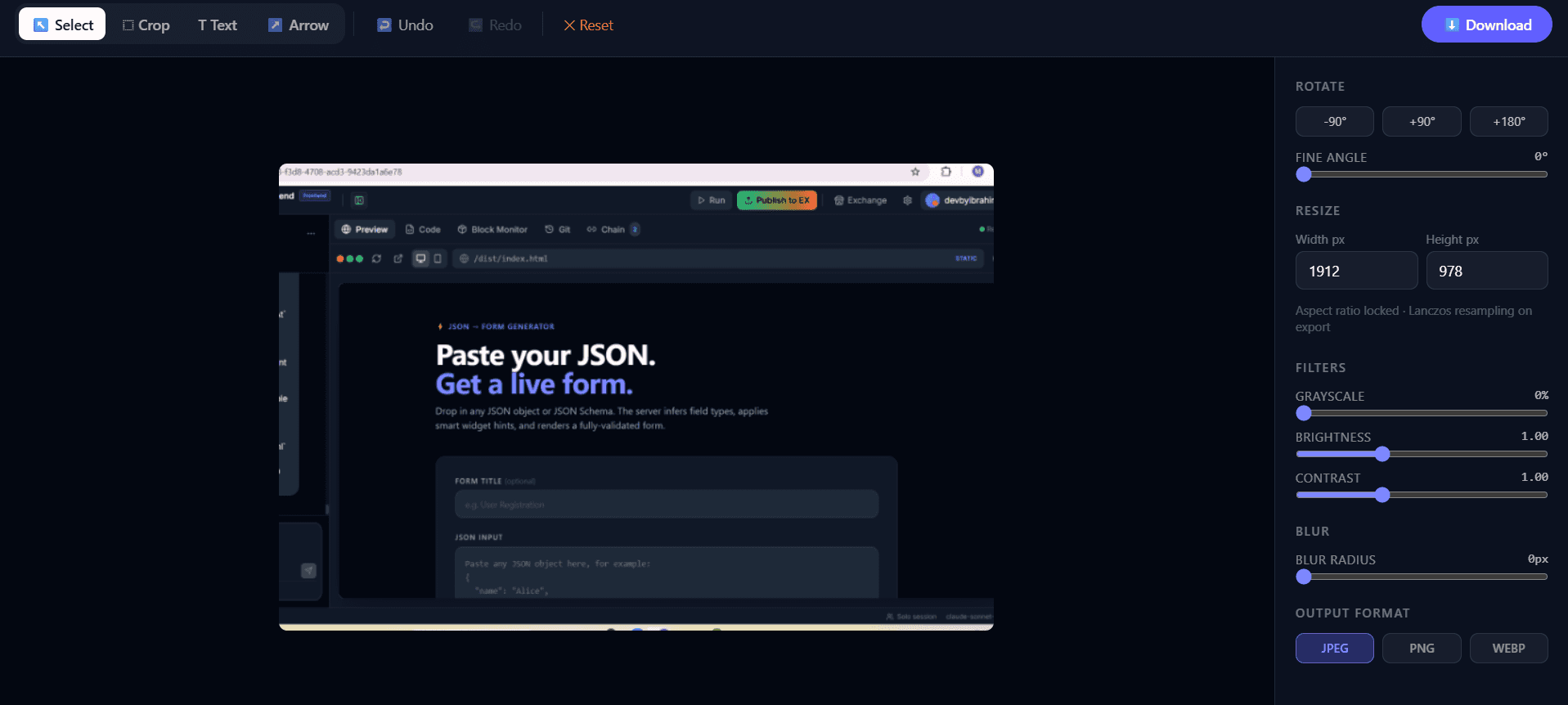
Chain package: frontend (Image Editor with Filters & Annotations (Canvas) - Frontend) + backend (Image Editor with Filters & Annotations (Canvas) - Backend)
A Node.js + Express + TypeScript backend that accepts an image upload and applies a configurable pipeline of transformations — rotation, crop, resize, brightness, contrast, grayscale, blur, text annotations, and arrow annotations — then returns the processed image as a binary download.
The Image Export API is a single-endpoint image processing service. Clients upload an image file (JPEG, PNG, or WebP) alongside a JSON params object that describes every transformation to apply. The server processes the image through a deterministic pipeline using sharp and streams the result back as a binary file download.
Supported transformations (applied in order):
| Layer | Technology |
|---|---|
| Runtime | Node.js |
| Framework | Express 4 |
| Language | TypeScript |
| Image processing | sharp |
隔離されたサンドボックスを起動しサーバー側で実行 — ローカル設定不要。
この製品をお使いのAI IDE・Webビルダー・クラウドIDEに直接取り込みます。
Download your licensed source snapshot from the library, then follow the setup guide in your workspace.
まだレビューがありません。
Sign in to join the discussion
Loading discussion…
| File upload |
| multer |
| CORS | cors |
npm install
npm run build
npm run dev
npm run build
npm start
The server listens on port 9033 by default (or the value of the PORT environment variable).
Server running on port 9033
| Variable | Default | Description |
|---|---|---|
PORT | 9033 | TCP port the server listens on |
No .env file is required. PORT is the only variable consumed by the application.
| Concern | Choice |
|---|---|
| Field naming | camelCase |
| Coordinate system | Fractional (0–1 relative to image dimensions) |
| Font / stroke sizes | px relative to a 1000 px-wide reference image |
| Timestamps | ISO 8601 (YYYY-MM-DDTHH:MM:SS.sssZ) |
| Error responses | { "error": "<message>" } |
| Success response | Binary image stream (not JSON) |
Returns the server health status and current UTC timestamp.
Request
curl -s http://localhost:9033/api/health
Response 200 OK
{
  "status": "ok",
  "timestamp": "2026-04-20T12:00:00.000Z"
}
Uploads an image and applies a transformation pipeline. Returns the processed image as a binary file download.
Request format: multipart/form-data
| Field | Type | Required | Description |
|---|---|---|---|
image | File | ✅ | Source image. Accepted MIME types: image/jpeg, image/png, image/webp. Max size: 50 MB. |
params | String (JSON) | ✅ | JSON-encoded transformation parameters (see schema below). |
params schema{
"rotate": 0, // Degrees clockwise. 0 = no rotation.
"crop": { // null = no crop
"x": 0.0, // Left edge as fraction of image width (0–1)
"y": 0.0, // Top edge as fraction of image height (0–1)
"width": 1.0, // Crop width as fraction of image width (0–1)
"height": 1.0 // Crop height as fraction of image height (0–1)
},
"resize": { // null = no resize
"width": 1280, // Target width in px (fit-inside, aspect ratio preserved)
"height": 720 // Target height in px
},
"blur": 0, // Gaussian blur sigma. 0 = off. Range: 0.3–1000.
"brightness": 1.0, // Multiplier. 1.0 = unchanged. 0.5 = half, 2.0 = double.
"contrast": 1.0, // Multiplier. 1.0 = unchanged. >1 = more contrast.
"grayscale": 0, // 0 = colour, any non-zero value = grayscale.
"outputFormat": "jpeg", // "jpeg" | "png" | "webp"
"texts": [ // Optional. Array of text annotations.
{
"text": "Hello world",
"x": 0.05, // Anchor X as fraction of image width
"y": 0.05, // Anchor Y as fraction of image height
"fontSize": 48, // px at 1000 px reference width (scales with image)
"color": "#ffffff", // Any CSS colour string
"bold": true,
"italic": false
}
],
"arrows": [ // Optional. Array of arrow annotations.
{
"x1": 0.2, // Tail X as fraction of image width
"y1": 0.2, // Tail Y as fraction of image height
"x2": 0.5, // Head X as fraction of image width
"y2": 0.5, // Head Y as fraction of image height
"color": "#ff0000", // Any CSS colour string
"strokeWidth": 4 // px at 1000 px reference width (scales with image)
}
]
}
Response 200 OK
Binary image stream. Response headers:
| Header | Example value |
|---|---|
Content-Type | image/jpeg |
Content-Disposition | attachment; filename="edited-image.jpg" |
Content-Length | 204800 |
Error responses
| Status | Condition | Body |
|---|---|---|
400 | No image file attached | { "error": "No image file provided." } |
400 | params field is not valid JSON | { "error": "Invalid JSON in params field." } |
400 | Unsupported MIME type | { "error": "Unsupported file type: image/gif" } |
413 | File exceeds 50 MB | { "error": "File exceeds 50 MB limit." } |
500 | Processing failure | { "error": "<message>" } |
curl -s -X POST http://localhost:9033/api/image/export \
  -F "image=@/path/to/photo.jpg" \
  -F 'params={"rotate":0,"crop":null,"resize":null,"blur":0,"brightness":1,"contrast":1,"grayscale":0,"outputFormat":"jpeg"}' \
  --output edited-image.jpg
curl -s -X POST http://localhost:9033/api/image/export \
  -F "image=@/path/to/photo.jpg" \
  -F 'params={
    "rotate": 90,
    "crop": { "x": 0.1, "y": 0.1, "width": 0.8, "height": 0.8 },
    "resize": { "width": 1280, "height": 720 },
    "blur": 0,
    "brightness": 1.1,
    "contrast": 1.2,
    "grayscale": 0,
    "outputFormat": "webp"
  }' \
  --output edited-image.webp
curl -s -X POST http://localhost:9033/api/image/export \
  -F "image=@/path/to/photo.png" \
  -F 'params={
    "rotate": 0,
    "crop": null,
    "resize": null,
    "blur": 0,
    "brightness": 1,
    "contrast": 1,
    "grayscale": 0,
    "outputFormat": "png",
    "texts": [
      {
        "text": "Look here!",
        "x": 0.05,
        "y": 0.05,
        "fontSize": 48,
        "color": "#ffffff",
        "bold": true,
        "italic": false
      }
    ],
    "arrows": [
      {
        "x1": 0.15,
        "y1": 0.12,
        "x2": 0.45,
        "y2": 0.40,
        "color": "#ff0000",
        "strokeWidth": 4
      }
    ]
  }' \
  --output annotated.png
curl -s -X POST http://localhost:9033/api/image/export \
  -F "image=@/path/to/photo.jpg" \
  -F 'params={"rotate":0,"crop":null,"resize":null,"blur":3.5,"brightness":1,"contrast":1,"grayscale":1,"outputFormat":"jpeg"}' \
  --output grayscale-blurred.jpg
Other services can reach this API at:
https://back.tetrees.ai/api/sandbox-bridge/sandbox-2f4f988c8be3c4b39d210d2f7a503deb
Append the endpoint path, e.g.:
POST https://back.tetrees.ai/api/sandbox-bridge/sandbox-2f4f988c8be3c4b39d210d2f7a503deb/api/image/export
Note: Test locally using
http://localhost:9033. The bridge URL is for external consumers only.
A browser-based image editing tool built with Vite + React + TypeScript + Tailwind CSS v4. No backend required — everything runs locally in the browser.
| Tool | Version |
|---|---|
| Node.js | 18 or later |
| npm | 9 or later |
# Clone or unzip the project, then:
cd tetrees-frontend
npm install
node_modulesis not committed. You must runnpm installbefore any other command.
npm run dev
http://localhost:5173 by defaultsrc/ are reflected instantly in the browsernpm run typecheck
Runs tsc --noEmit — reports TypeScript errors without emitting any files. Run this after changing shared types or component props.
npm run lint        # report issues
npm run lint:fix    # auto-fix where possible
npm run build
Output is written to dist/. The build uses relative asset paths (base: "./" in vite.config.ts) so the app works correctly when served from a subdirectory or inside an iframe.
npm run preview
Serves the dist/ folder at http://localhost:4173.
src/
├── App.tsx              # Root component — state, undo/redo, export logic
├── main.tsx             # React entry point
├── index.css            # Tailwind v4 import + global styles
├── vite-env.d.ts        # Vite environment type declarations
│
├── components/
│   ├── Toolbar.tsx      # Top toolbar — tool selector, undo/redo, reset, export
│   ├── EditPanel.tsx    # Right-side panel — sliders, format picker, crop confirm
│   └── CanvasEditor.tsx # Canvas rendering — draws image, filters, annotations
│
├── types/
│   └── editor.ts        # Shared TypeScript types (EditParams, Annotation, Tool, CropRegion)
│
├── utils/
│   └── geometry.ts      # Coordinate math — converts display-space crop to original-image space
│
└── lib/                 # (reserved for future shared utilities)
Supported formats: JPEG, PNG, WebP, GIF, BMP, and any format the browser's <img> element can decode.
Images wider or taller than 900 px are scaled down for display. The original full-resolution image is kept in memory and used for export.
| Control | Range | Effect |
|---|---|---|
| Brightness | 0 – 2 | Multiplies pixel luminance (brightness() filter) |
| Contrast | 0 – 2 | Adjusts tonal range (contrast() filter) |
| Blur | 0 – 20 px | Gaussian blur (blur() filter) |
| Grayscale | 0 – 1 | 0 = full colour, 1 = fully desaturated |
All adjustments are non-destructive — they are applied at export time on the full-resolution image.
Use the Rotate control in the Edit Panel to rotate the image in degree increments. Rotation is applied around the image centre at export.
The crop selection is drawn in display coordinates and automatically transformed back to original-image coordinates before being stored, so the full-resolution export is always pixel-accurate.
Annotations are stored in original-image coordinates and rendered at full resolution on export.
Ctrl+Z) restores the previous stateCtrl+Y / Ctrl+Shift+Z) re-applies an undone changeThe app renders an offscreen canvas at the original image resolution, applies all adjustments and annotations, then triggers a browser download of the result file.
JPEG export uses the browser's default quality setting (~92%). PNG export is lossless.
| Shortcut | Action |
|---|---|
Ctrl + Z | Undo |
Ctrl + Y | Redo |
Ctrl + Shift + Z | Redo (alternate) |
Shortcuts are handled globally and work regardless of which panel has focus.
The canvas always renders a scaled-down display copy (max 900 px on the longest side). All annotation positions and crop regions are stored in original-image space so that exports are resolution-independent. The conversion is handled by src/utils/geometry.ts → transformCropToOriginal.
This is a fully client-side application. No data is sent to any server. Images are processed entirely in the browser using the Canvas 2D API.
Styles use Tailwind v4's @import "tailwindcss" syntax (in src/index.css). There is no tailwind.config.js — configuration is done via CSS custom properties and @layer blocks directly in the stylesheet.
npm install <package-name>
npm install -D <dev-package-name>
After adding a dependency, re-run npm run build to confirm the bundle compiles cleanly.
サンドボックス検証が完了し、検出された実行経路は合格しました。
This Express backend / api completed archive review with strong static results. Structure, dependency manifests, documentation, functional source, and common risk patterns were checked by the Tetrees verification pipeline; runtime phases are stated separately. Final verified scores after isolated runtime evidence: overall 8.8 and security 9.
Deterministic AVCP artifact review
パイプライン avcp-2026-08-04.1 · SHA-256 e052ccdc2f1542f8…
This version-scoped review deterministically inspects the submitted archive for structure, dependencies, documentation, functional source, and common malicious or high-risk signals. Build and test phases are reported as passed only after an isolated sandbox audition. It is not a guarantee of perfect security.
レビュー日 2026年8月7日
完全なインストールガイドと統合プロンプトは購入後に解放されます。
Automation, Utilities & Developer Tools
無料